
 WhatsApp
 +48608012047
Question
Does the module support the latest version of Magento 2 (e.g., 2.4.7)?
Answer
Yes — the module has been tested on Magento 2 version 2.4.7 and is also compatible with versions 2.4.0–2.4.8.
 Polnisch
  English
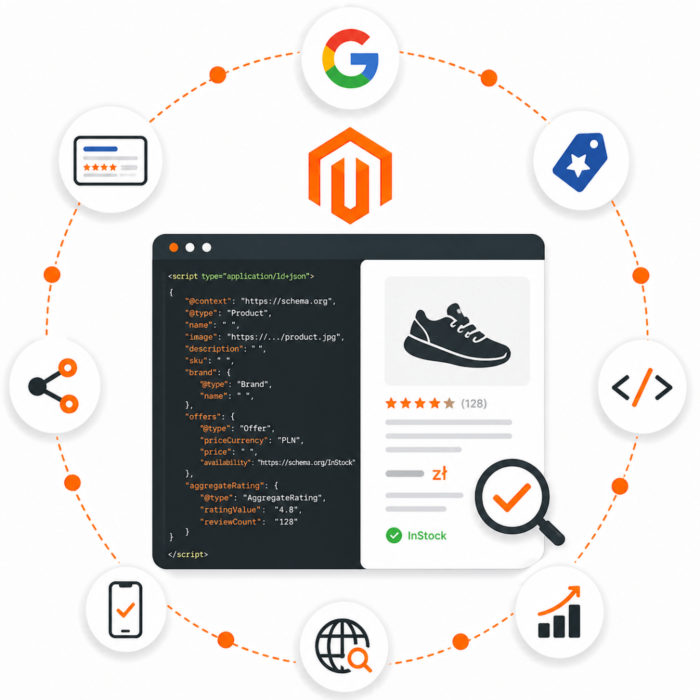
 The SEO Rich Data module for Magento 2 adds complete schema.org-compliant structured data in the JSON-LD format supported by Google to your store. This allows your products, categories, tabs, and content to appear in search results as rich snippets, directly improving visibility, CTR, and SEO.
Product
Detailed product description: name, description, price, currency, stock status, manufacturer, brand, SKU, MPN.
Offer
Information about offer availability and terms (new condition, availability, price validity date).
Brand / Manufacturer
Automatic brand and manufacturer markup based on product data.
Organization
Your company data (seller name, contact details, website).
BreadcrumbList
Breadcrumbs that help Google better understand the page structure.
SearchAction (WebSite)
A signal for Google showing how the store internal search engine works.
ItemList (for category pages)
A list of products in a category (name, image, link) — speeds up indexing and gives Google context.
Reviews (Review + AggregateRating)
Automatic generation of structured data based on customer reviews: rating, number of reviews, review content, and author data. The module creates both individual Review entries and an aggregated AggregateRating summary, enabling star ratings to appear in Google results (rich snippets) and significantly increasing CTR.
VideoObject (NEW)
Detects videos in the product gallery and adds them as structured data (thumbnail, link, date).
FAQPage (INTEGRATION WITH THE Ask About Product MODULE)
If you have our Ask About Product module installed, all questions with answers for a given product are automatically converted into FAQPage data. This allows Google to display a questions and answers section directly in search results!
If you use our second module — Ask About Product, FAQ structured data is generated dynamically based on real questions and answers provided by the seller. This increases the authenticity of the data and its SEO value.
In addition, questions and answers can be visible as a tab on the product page — with the option to enable it and set its title from the configuration.
Higher visibility in Google results – your products can appear with price, availability, reviews, and other information.
Better CTR – users are more likely to click rich results.
Improved indexability – Google better understands the page structure and indexes new content faster.
Unmatched content quality – you show Google data that was previously hidden only in HTML.
Option to enable/disable individual components (e.g., FAQ, VideoObject).
Custom title for the questions tab (for the Ask About Product module).
Automatic mechanism for detecting and generating JSON-LD data.
Magento 2.4.x (tested on 2.4.7)
PHP 8.1+
Recommended: Ask About Product module for full functionality (FAQ)
Ready-to-install module via Composer
Complete documentation
Code compliant with Magento guidelines
Technical support during implementation
Want your store to stand out in Google? This module is your SEO in the PRO version. Order now and increase your visibility!
The Kowal_SeoRichData module adds schema.org structured data in JSON-LD format to Magento 2. Generated data may include products, offers, prices, availability, ratings, reviews, breadcrumbs, organization data, site name, search box, social profiles, FAQ, and video.
The module configuration is available in the Magento admin panel:
Stores > Configuration > Kowal > SEO Rich Data
kowal/module-seo-rich-data package.kowal/base.bin/magento commands.composer config repositories.seo.rich.data vcs https://github.com/kowalco/magento-2-seo-rich-datacomposer config --global --auth github-oauth.github.com composer require kowal/module-seo-rich-dataphp bin/magento module:enable Kowal_SeoRichDataphp bin/magento setup:upgradephp bin/magento setup:di:compilephp bin/magento setup:static-content:deployphp bin/magento cache:flushapp/code/Kowal/SeoRichDataphp bin/magento module:enable Kowal_SeoRichDataphp bin/magento setup:upgradephp bin/magento cache:flushAfter installation, the module adds the product attribute:
| Attribute | Meaning |
|---|---|
offer_item_condition | Product condition used to generate itemCondition in offers. |
The attribute supports the following values:
| Value in Magento | JSON-LD value |
|---|---|
DamagedCondition | https://schema.org/DamagedCondition |
NewCondition | https://schema.org/NewCondition |
RefurbishedCondition | https://schema.org/RefurbishedCondition |
UsedCondition | https://schema.org/UsedCondition |
If the product has no attribute value set, the module treats it as NewCondition.
All configuration fields are available for the Default, Website, and Store View scopes, according to Magento settings.
Enabled, Show ..., and similar fields use standard Magento values:
| Value | Meaning |
|---|---|
Yes | The feature is enabled and can generate JSON-LD data. |
No | The feature is disabled. |
This section is responsible for structured data for the navigation path.
| Field | Meaning | Values |
|---|---|---|
Enabled | Enables generation of BreadcrumbList data. | Yes, No |
Fixed Category Path | On the product page, uses the most specific category path when Magento does not provide full category context. | Yes, No |
Type | Defines the length of the breadcrumbs path generated for the search engine. | Default (Long), Short |
Values for the Type field:
| Value | Meaning |
|---|---|
Default (Long) | Full path, e.g. Store > Category > Subcategory > Product. |
Short | Shortened path, e.g. Store > Subcategory > Product. |
This section is responsible for WebSite data, which may help Google recognize the website name.
| Field | Meaning | Values |
|---|---|---|
Enabled | Enables generation of WebSite data. | Yes, No |
Website Name | Website/store name passed in structured data. | Text, e.g. store name. |
This section is responsible for Organization data.
| Field | Meaning | Values |
|---|---|---|
Enabled | Enables generation of organization data. | Yes, No |
Organization Name | Company or store name. | Text; required after enabling the section. |
Logo Url | Full URL of the organization logo. | URL to the image file. |
Description | Organization description. | Text. |
Description Length | Maximum number of description characters. | Number; empty means no truncation. |
Country | Organization country. | Country code from the Magento list. |
Region/State | Region or state. | Text. |
ZIP/Postal Code | ZIP/postal code. | Text. |
City | City. | Text. |
Street Address | Street and number. | Text. |
Sales | Sales department phone number. | Number in international format, e.g. +48.... |
Technical Support | Technical support phone number. | Number in international format. |
Customer Service | Customer service phone number. | Number in international format. |
The country from this section can be used as a fallback for the shipping country and return policy country if the relevant fields in the product section are empty.
This section adds the organization social profiles. For the data to make sense, the Organization section should be enabled.
| Field | Meaning | Values |
|---|---|---|
Enabled | Enables generation of social profile links. | Yes, No |
Facebook | Facebook profile URL. | Full URL. |
Twitter | Twitter / X profile URL. | Full URL. |
Google+ | Google+ profile URL. | Full URL; historical configuration field. |
Instagram | Instagram profile URL. | Full URL. |
YouTube | YouTube channel URL. | Full URL. |
LinkedIn | LinkedIn profile URL. | Full URL. |
Myspace | Myspace profile URL. | Full URL; historical configuration field. |
Pinterest | Pinterest profile URL. | Full URL. |
SoundCloud | SoundCloud profile URL. | Full URL. |
Tumblr | Tumblr profile URL. | Full URL. |
Empty fields are skipped.
This section is responsible for SearchAction data, which may allow the store search box to appear in Google results.
| Field | Meaning | Values |
|---|---|---|
Enabled | Enables generation of website search data. | Yes, No |
This section is responsible for generating product data on category pages.
| Field | Meaning | Values |
|---|---|---|
Show Products Data | Adds structured data for products visible on the category page. | Yes, No |
Enabling this option may reduce category page performance because the module must collect data for many products.
This section is responsible for the main Product product data and offers data.
| Field | Meaning | Values |
|---|---|---|
Enabled | Enables generation of product JSON-LD on the product page. | Yes, No |
Show Availability | Adds availability in offers. | Yes, No |
priceValidUntil Default Value | Default price validity date. | Date. |
Use “Special Price To” Value for priceValidUntil Snippet | If the product has an active special price and a Special Price To date, that date replaces the default value. | Yes, No |
Show Condition | Adds itemCondition in offers. | Yes, No |
Description | Defines the source of the product description in JSON-LD. | None, Product Short Description, Product Full Description, Page Meta Description |
Values for the Description field:
| Value | Meaning |
|---|---|
None | Does not retrieve the description from configuration; the code may use the product name as a fallback if the description is empty. |
Product Short Description | Uses the product short description. |
Product Full Description | Uses the product full description. |
Page Meta Description | Uses the page meta description. |
| Field | Meaning | Values |
|---|---|---|
Show Configurable Products as | Defines how offers are generated for configurable products. | Main Offer, List of Associated Products Offers, Aggregate Offer |
Show Grouped Products as | Defines how offers are generated for grouped products. | Main Offer, List of Associated Products Offers, Aggregate Offer |
Values:
| Value | Meaning |
|---|---|
Main Offer | Generates one offer for the main product. |
List of Associated Products Offers | Generates a separate offer for each simple or associated product. |
Aggregate Offer | Generates AggregateOffer with the lowest price, highest price, and number of offers. |
| Field | Meaning | Values |
|---|---|---|
Show Rating | Adds aggregateRating and review to product data. | Yes, No |
Use Yotpo Reviews instead of Magento Reviews | Retrieves reviews from Yotpo instead of Magento Reviews. | Yes, No |
Rating Format | Defines the rating scale. | Percentage Scale, Numeric Scale |
Number of Reviews | Limit for the number of latest reviews added to JSON-LD. | Number; empty means all reviews. |
Values for the Rating Format field:
| Value | Meaning |
|---|---|
Percentage Scale | Ratings are interpreted on a percentage scale. |
Numeric Scale | Ratings are interpreted on a numeric scale. |
Integration with Yotpo requires the availability of a module supporting Yotpo. If the module is not installed, the Yotpo configuration should not be enabled.
| Field | Meaning | Values |
|---|---|---|
Brand | Product attribute used to generate the brand property. | Any product attribute from the list. |
EAN / GTIN Attribute | Product attribute used as a global product identifier. | Any product attribute from the list. |
Manufacturer | Product attribute used to generate the manufacturer property. | Any product attribute from the list. |
The EAN / GTIN Attribute field generates the property depending on the number of digits:
| Number of digits | JSON-LD property |
|---|---|
| 8 | gtin8 |
| 12 | gtin12 |
| 13 | gtin13 |
| 14 | gtin14 |
| Other positive number of digits | gtin |
The module removes non-digit characters from the EAN / GTIN value before generating JSON-LD.
The shipping section is responsible for generating shippingDetails in offers. Data is added only when the section is enabled and has the complete set of required values.
| Field | Meaning | Values |
|---|---|---|
Show Shipping Details | Enables generation of shippingDetails. | Yes, No |
Shipping Country | Delivery country. | Country code from the Magento list; if empty, the country from the Organization section is used. |
Shipping Price | Shipping cost. | Number equal to or greater than 0; 0 means free shipping. |
Handling Time Min Days | Minimum order handling time. | Integer, days. |
Handling Time Max Days | Maximum order handling time. | Integer, days. |
Transit Time Min Days | Minimum transit time. | Integer, days. |
Transit Time Max Days | Maximum transit time. | Integer, days. |
The shipping cost currency is taken from the product offer currency.
Example meaning of values:
| Field | Example | Meaning |
|---|---|---|
Shipping Price | 0 | Free shipping. |
Handling Time Min Days | 0 | The order can be handled on the same day. |
Handling Time Max Days | 1 | Order handling takes a maximum of 1 day. |
Transit Time Min Days | 1 | Delivery takes at least 1 day. |
Transit Time Max Days | 5 | Delivery takes a maximum of 5 days. |
The return policy section is responsible for generating hasMerchantReturnPolicy in offers. Data is added only when the section is enabled and has the required values.
| Field | Meaning | Values |
|---|---|---|
Show Merchant Return Policy | Enables generation of hasMerchantReturnPolicy. | Yes, No |
Return Policy Country | Country where the return policy applies. | Country code from the Magento list; if empty, the country from the Organization section is used. |
Return Policy Category | Return policy type. | Finite Return Window, Returns Not Permitted, Unlimited Return Window |
Merchant Return Days | Number of days for returns. | Integer; required for Finite Return Window. |
Return Method | Supported return method. | -- Empty --, Return By Mail, Return In Store, Return At Kiosk |
Return Fees | Information about return fees. | -- Empty --, Free Return, Customer Responsibility, Return Shipping Fees |
Return Shipping Fee | Return shipping fee amount. | Number greater than 0; required only for Return Shipping Fees. |
Values for the Return Policy Category field:
| Value | JSON-LD value | Meaning |
|---|---|---|
Finite Return Window | https://schema.org/MerchantReturnFiniteReturnWindow | Returns are possible for a specified number of days. Requires Merchant Return Days. |
Returns Not Permitted | https://schema.org/MerchantReturnNotPermitted | Returns are not permitted. |
Unlimited Return Window | https://schema.org/MerchantReturnUnlimitedWindow | Returns are possible without a specified day limit. |
Values for the Return Method field:
| Value | JSON-LD value | Meaning |
|---|---|---|
-- Empty -- | no value | The return method is not added to JSON-LD. |
Return By Mail | https://schema.org/ReturnByMail | Return by mail. |
Return In Store | https://schema.org/ReturnInStore | Return in a physical store. |
Return At Kiosk | https://schema.org/ReturnAtKiosk | Return at a point/kiosk. |
Values for the Return Fees field:
| Value | JSON-LD value | Meaning |
|---|---|---|
-- Empty -- | no value | Fee information is not added to JSON-LD. |
Free Return | https://schema.org/FreeReturn | The return is free. |
Customer Responsibility | https://schema.org/ReturnFeesCustomerResponsibility | The customer bears the return cost. |
Return Shipping Fees | https://schema.org/ReturnShippingFees | The return has a specified return shipping fee. Requires Return Shipping Fee. |
The currency of the Return Shipping Fee field is taken from the product offer currency.
The Custom Properties field lets you add custom properties to product JSON-LD.
Format:
wlasciwosc_jsonld,kod_atrybutuIf only one element is provided, the module treats it both as the JSON-LD property name and the attribute code.
Default value:
skumpn,skuMeaning of the default value:
| Line | Effect |
|---|---|
sku | Adds sku based on the sku attribute. |
mpn,sku | Adds mpn based on the sku attribute. |
Example of adding a custom attribute:
color,colormaterial,materialTo reduce Google Search Console warnings for product data, configure at least:
| Field | Recommendation |
|---|---|
Product Rich Data > Enabled | Yes |
Show Availability | Yes |
Brand | Select the attribute containing the product brand. |
EAN / GTIN Attribute | Select the attribute containing EAN / GTIN if the products have a global identifier. |
Show Shipping Details | Yes, if the store has a uniform shipping policy that can be described in the configuration. |
Show Merchant Return Policy | Yes, if the store has a uniform return policy that can be described in the configuration. |
Custom Properties | Keep at least sku; optionally add mpn if the store has such an identifier. |
After changing the configuration, run:
php bin/magento cache:flushIf the store uses additional HTTP cache, Varnish, or a CDN, also clear those cache layers.
Version: 1.0.17
05/19/2026
Added
- Added support for the
shippingDetails field in the offers structure for JSON-LD product data. - Added support for the
hasMerchantReturnPolicy field in the offers structure for JSON-LD product data. - Added shipping data configuration:
- enabling/disabling generation of
shippingDetails, - shipping country,
- shipping cost,
- minimum and maximum order handling time,
- minimum and maximum transit time.
- Added return policy configuration:
- enabling/disabling generation of
hasMerchantReturnPolicy, - country where the policy applies,
- return policy type,
- number of days for returns,
- return method,
- return fees,
- optional return shipping fee amount.
- Added EAN / GTIN attribute selection in the product configuration.
- Added automatic mapping of EAN / GTIN values to
gtin8, gtin12, gtin13, gtin14, or gtin properties, depending on the number length. - Added source models for return policy configuration options:
ReturnPolicyCategory,ReturnMethod,ReturnFees.
Changed
- Improved retrieval of
brand and manufacturer attribute values for JSON-LD. - Added fallback retrieval of attribute values from raw EAV value when
getAttributeText() or getData() does not return a value. - Added fallback retrieval of brand / GTIN values from simple products for configurable and grouped products.
- Replaced the deprecated
BlockProduct::getResultArray() method with shared ModelJsonLdProductInfo logic to keep product data generation consistent on the product page and in category lists. - Extended the offers cache key with shipping and return policy configuration so configuration changes affect the generated JSON-LD.
Fixed
- Fixed a case where the configured
Brand attribute did not appear in product JSON-LD. - Completed missing data required by Google Search Console for merchant listings:
shippingDetails,hasMerchantReturnPolicy,- global product identifier via EAN / GTIN.

























From €153.75 €125.00
To €615.00 €500.00