Free cookie consent management tool by TermsFeedAktualizacja preferencji plików cookie

Interactive product photo gallery on the category page in Magento 2

€30.75 €25.00
COMPOSER Installation
M2-GALLERY-HOVER
Requires changes to the template
No
Minor changes
Significant changes
Requires programming knowledge
No
Basic
Advanced
Difficulty in configuration
Impact on performance
Compliance with Magento standards
  • Polnisch Polnisch
  • English English
  • 2.4.9
  • 2.4.8
  • 2.4.7
  • 2.4.6
  • 2.4.5
  • 2.4.4
  • 2.4.3
  • 2.4.2
  • 2.4.1
  • 2.4.0
  • 2.3.7
  • 2.3.6
  • 2.3.5
  • 2.3.4

Kowal_ProductGalleryHover – interactive product photo gallery in Magento 2

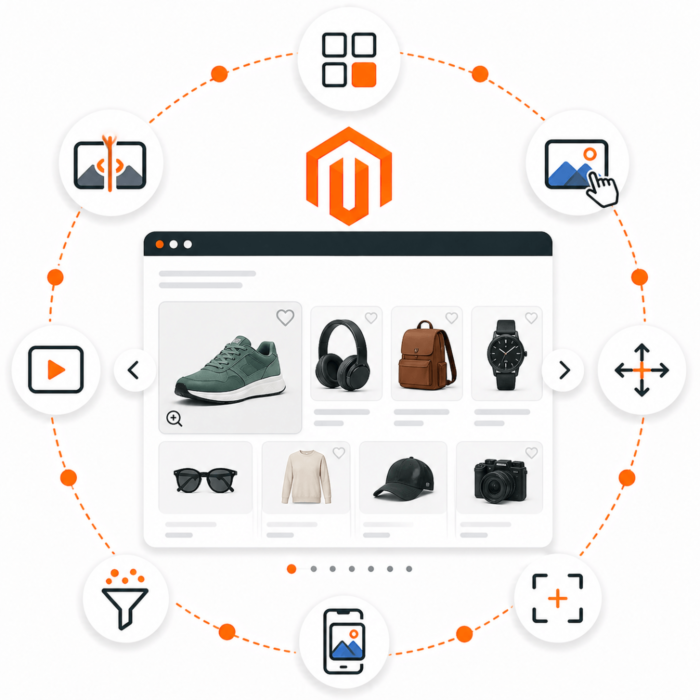
Kowal_ProductGalleryHover is a module that adds a modern hover gallery feature to product listings (category view) in Magento 2 — allowing users to preview additional product photos directly at the category level. Users can view more images by hovering the cursor or swiping with a finger on mobile devices, without having to open the product page.

Module benefits

  • Better user experience (UX) – a quick product preview from different angles increases engagement and conversion.
  • Modern interactivity – support for browsing photos with a button, gesture, or mouse movement.
  • Full mobile compatibility – image swiping on touchscreens.
  • No impact on performance – images are loaded asynchronously in the background (AJAX + IntersectionObserver), so they do not burden the page.
  • SEO and Core Web Vitals optimization – main category images are rendered by Magento, while additional galleries are loaded only after the page has loaded, helping maintain a high PageSpeed Insights score.
  • Built-in lazy-load mode – the gallery loads only for products visible on the user's screen.
  • Option to enable/disable the module from the admin panel (Stores → Configuration → Kowal → Product Gallery Hover).
  • Automatic image scaling – photos are proportionally resized (according to the dimensions defined in view.xml) to minimize data transfer.

How the module works

The module was designed with maximum performance in mind. It does not modify the Magento layout or DOM structure – it works as a lightweight JS script that:

  1. Listens for mouseenter / touchstart events on product elements.
  2. At the moment of interaction, retrieves the photo gallery for the given product through a lightweight AJAX request (JSON).
  3. Displays additional photos in a separate hover layer, without reloading the page.
  4. Images are scaled and cached on the server side to reduce data size.

In addition, the module uses IntersectionObserver – a native lazy loading mechanism that automatically loads galleries for products visible in the viewport. As a result, users see ready-to-use galleries instantly, while the page maintains its performance.

SEO benefits

The module has been optimized so that it does not negatively affect crawl budget, LCP, CLS, or TBT. All dynamic images are loaded after the main page content has loaded (initialization in before.body.end), which makes the module fully safe in terms of SEO and performance.

  • No impact on the HTML source – search engine bots see the original page code.
  • Does not generate additional requests on initial load – all images are fetched only when the user actually sees them.
  • Maintains full compatibility with Magento caching (Full Page Cache, Varnish, Redis).

Why it is worth it

Modern e-commerce stores should offer fast and intuitive access to product information. The Kowal_ProductGalleryHover module delivers exactly that — an interactive preview without delays, without the risk of performance loss, and fully compatible with Magento 2 and SEO best practices.

Questions and Answers

Question
Does the module allow you to display a product photo gallery directly on the category page in a Magento 2 store?
Answer
Yes — the module is used to add an interactive product photo gallery to category pages, which increases the visual appeal of the offer and can help engage customers.
Question
Can I set specific products or a category for which the gallery will be displayed?
Answer
Yes — the module allows you to choose on which category pages or for which products the gallery should be displayed, providing flexibility in presenting your assortment.
Question
Does installing the module require editing Magento core files or the store theme?
Answer
No — the module works as a standard extension for Magento 2 and does not require overwriting the system's core files. (General Magento 2 extension practice)
Question
Is the gallery responsive — will it look good on mobile devices and tablets?
Answer
Yes — a good gallery module should be designed responsively, so product photos in the gallery will display correctly on different devices.
Question
Can I customize the appearance of the gallery—for example, choose the photo layout, thumbnail size, and hover effects?
Answer
Yes—the module allows you to configure the appearance of the photo gallery: the layout, the number of photos per row, and optional hover effects, making it possible to match the style to the store’s theme.
Question
Does the module affect store performance—with a very large product catalog or number of images?
Answer
It can—although adding a gallery is mainly a front-end change, a larger number of images, poor image optimization, or improper configuration can affect page loading. Testing in a staging environment is always recommended.
Question
Can I disable the gallery for certain categories or devices (e.g., desktop only, guests only)?
Answer
Yes — good gallery modules allow you to set display conditions, such as only for a specific customer group, store view, or device types.
Question
Does the module support different store views (multi-store) and different languages (locale)?
Answer
Yes — the module for Magento 2 should support multi-store and multilingual environments, allowing independent gallery configuration for different store views.
Question
Does the module allow photos to be easily assigned to a gallery — do I have to manually upload and assign all images?
Answer
Yes — the module typically allows you to easily assign photos or products to a gallery through the Magento admin panel, making gallery management easier.
Question
Do I receive technical support and updates after purchasing the module?
Answer
Yes — the manufacturer of the Kowal store declares technical support and the availability of updates for its modules.
Implemented in real Magento 2 stores
Case Study: Product gallery with HOVER effect on the category page

Project

SMMASH is a sportswear store where the product is sold not only by its cut and size, but also by the energy of the pattern, color, print, and fit for a specific activity. The brand communicates through strong visual collections and a broad sports division: MMA, OCR, Crossfit, running, BJJ, Muay Thai, judo, boxing, and kickboxing.

The store operates in the apparel industry, but its catalog requires a more dynamic presentation than a classic fashion store. Products often differ in graphic details, construction, training purpose, and how they are worn. For the user, a quick view of a second shot, color, or visual variant may be more important than the product name itself.

Business context

SMMASH combines technical apparel sales with a strong visual brand identity. The offering includes men's, women's, and children's products, as well as club apparel and personalized designs. The website features lifestyle and sports categories, including Combat, OCR, Training, and Running, which shows that customers often browse products by activity style, not only by clothing type.

An important element of the store is also the presentation of designs and visualizations. In sportswear, the purchase decision is strongly linked to the product's appearance: intense colors, patterns, contrasts, and print layout need to be visible already at the listing level.

Challenge

The biggest challenge in this type of catalog is balancing two needs:

  • fast loading of product listings,
  • attractive visual presentation without the need to open each product page.

In sportswear, one static image on the listing is often not enough. The customer wants to quickly see what the product looks like from another angle, how the print is arranged, whether the color is bold enough, and whether the product fits a specific training style.

At the same time, a store with an extensive catalog cannot preload too many images at once, because that would burden the page, worsen the mobile experience, and could negatively affect Core Web Vitals.

Solution

For this type of store, a product gallery mechanism activated on hover or touch works particularly well. The listing remains lightweight on first render, but the user can quickly preview the next image without leaving the category page.

Key assumptions:

  • the initial category load remains as lightweight as possible,
  • additional images are fetched only after the page loads or when the product approaches the viewport,
  • the second image is prepared in advance before the customer hovers over the product,
  • the gallery also works for product lists loaded during scrolling,
  • on mobile, gallery handling does not block natural page scrolling.

In the case of SMMASH, this mechanism makes it possible to show more product value already on the listing: print, color scheme, detail, an alternative shot, or the way the product is presented on the body.

Effect for the user

The user can compare products faster without opening many product pages. This is especially important when the catalog contains many similar types of apparel, but each product has a different graphic design.

Benefits:

  • faster collection scanning,
  • better exposure of colors and patterns,
  • fewer clicks needed to compare products,
  • a more dynamic store feel,
  • maintaining a lightweight initial category load.

Why it fits SMMASH

SMMASH sells products with a strong visual component. In the case of rashguards, T-shirts, leggings, shorts, or sports singlets, the customer often reacts to appearance before analyzing technical details. That is why the listing should work not only as a catalog, but also as a quick lookbook.

The hover/swipe mechanism helps show:

  • intense patterns and colors,
  • alternative product shots,
  • print details,
  • differences between products in the same category,
  • the visual character of the collection.

Recommended development directions

  • a dedicated hover image attribute for products, so the store team can indicate the best shot for the listing,
  • separate logic for sports and lifestyle collections,
  • click analysis after hover interaction,
  • A/B test: classic listing vs. listing with an active second image,
  • refining prefetch priority for the first products in view.

Summary

SMMASH is an example of an apparel store where visual presentation is part of the product. Color, print, and the energy of the design have a direct impact on the purchase decision. A listing-activated gallery makes it possible to show these elements faster, without burdening the initial page load.

Case Study: Interactive Product Gallery on the Category Page

Project

Slumbersac is a store specializing in children's sleeping bags, where the product belongs to the apparel category, but the purchase decision is more technical than in classic fashion. A parent chooses not only the pattern and size, but also the sleeping bag construction, TOG rating, season, material, and practical details related to the child's safety and comfort.

The range includes, among others, sleeping bags with legs, classic sleeping bags, seasonal variants in 0.5 TOG, 1.0 TOG, 2.5 TOG, and 3.5 TOG, as well as solutions such as detachable sleeves and fold-over leg cuffs with ABS.

Business context

At Slumbersac, the product needs to be explained visually. A parent wants to quickly understand how a specific model differs: whether it has legs, whether the sleeves are detachable, what temperature range it covers, and whether it is suitable for summer, winter, or year-round use.

The site features product and trust messages, including detachable sleeves, fold-over leg cuffs with ABS, a Google rating of 4.8, fast shipping, and messaging about the most frequently chosen sleeping bag. This shows that the store combines emotional presentation of patterns with very practical arguments.

Challenge

In a children's sleeping bag store, the product list must handle several types of information at the same time:

  • product pattern and color,
  • type of construction,
  • TOG categories,
  • seasonality,
  • functional details, e.g. sleeves, legs, zipper, material,
  • trust and a sense of safety.

One image on the listing may show the print, but it does not always explain the construction. For a parent, it is important to quickly distinguish a classic sleeping bag from a sleeping bag with legs or a variant with detachable sleeves.

The second challenge is mobile. Shopping for children's products often takes place on a phone, so the interaction must feel natural: page scrolling cannot be blocked, and moving to the next image should be simple.

Solution

For Slumbersac, it is valuable to extend the product listing with a quick preview of the next product image. On hover or swipe on mobile, the user can see an additional shot that shows the sleeping bag construction or a practical detail.

Key assumptions:

  • the initial category load remains lightweight,
  • the second image is prepared in advance for visible products,
  • additional products loaded during scrolling are also included in the prefetch mechanism,
  • on mobile, a horizontal gesture is used for the gallery, while vertical movement still scrolls the page,
  • the store can indicate a dedicated hover image, e.g. a shot showing detachable sleeves or legs.

The role of the hover image attribute

In such a store, a dedicated image attribute, e.g. on_hover, is especially useful. Thanks to it, the store team can decide for themselves which image best explains the product on the listing.

Examples of use:

  • first image: an attractive sleeping bag pattern,
  • hover image: a photo with the legs extended,
  • hover image: showing detachable sleeves,
  • hover image: a material or zipper detail,
  • hover image: a shot showing the shape of the sleeping bag on a child.

This is important because the automatic second image from the gallery is not always the best sales image. In the case of technical-apparel products, it is better to give the merchandiser control over what the customer sees as the first interaction.

Effect for the user

A parent can more quickly assess whether the product meets a specific need: a warmer sleeping bag for winter, a lightweight year-round model, a sleeping bag with legs for a child who walks, or a model with detachable sleeves.

Benefits:

  • faster recognition of the product construction,
  • fewer visits to product pages just to check a detail,
  • better comparison of TOG models and sleeping bag types,
  • a more understandable listing on mobile,
  • the ability for the store team to control the first hover image.

Why it fits Slumbersac

Slumbersac sells products that are simultaneously clothing, a sleep accessory, and a functional product for a child. The pattern aesthetics are important, but the parent pays just as much attention to practical solutions.

The hover/swipe gallery helps show:

  • the differences between a classic sleeping bag and a sleeping bag with legs,
  • detachable sleeves,
  • fold-over leg cuffs with ABS,
  • seasonality and TOG categories,
  • patterns and collections in a more engaging way.

Recommended development directions

  • use of the on_hover attribute to indicate the best functional image,
  • separate rules for categories: sleeping bags with legs, sleeping bags, organic cotton,
  • a test of whether a construction-focused hover image increases product visits,
  • analysis of mobile behavior: swipe versus clicking into the product page,
  • adding shorter product messages next to TOG filters.

Summary

Slumbersac is an example of an apparel store where the product image must explain the function, not just the look. A well-chosen second image on the listing can show the detail that determines the purchase: legs, sleeves, material, or the shape of the sleeping bag. The hover/swipe mechanism and the dedicated on_hover image give the store greater control over how quickly the customer understands the product.

Write Your Own Review
You're reviewing:Interactive product photo gallery on the category page in Magento 2
Your Rating