25 years of experience in e-commerce and Magento 2
Tooltip
For over 25 years, we have specialised in creating reliable solutions for e-commerce. We offer high-quality Magento 2 modules, developed and supported directly by an experienced team of programmers. Our products are designed with performance, security and the real needs of online shops in mind.
Fast delivery
Tooltip
We guarantee efficient and timely execution of every order, ensuring high quality of service and complete customer satisfaction.
Efficient implementation process
Tooltip
We carry out each order according to a proven process: from analysing customer needs, through design and implementation, to testing and post-launch support. We operate transparently and efficiently at every stage.
Simple and transparent complaint process
Tooltip
We care about customer satisfaction – in the event of problems with the module, we offer a clear complaint procedure, quick response and full technical support until the issue is resolved.
Working with clients worldwide
Tooltip
We carry out projects for companies from all over the world, providing reliable Magento 2 solutions regardless of time zone or language. Thanks to our flexible approach and efficient communication, we ensure effective international cooperation.
Free module updates
Tooltip
We provide free updates for our modules, so you can be sure that you are using the latest features, Magento compatibility, and current security standards – at no additional cost.
Payment by bank transfer
Tooltip
We offer convenient and secure online payment methods – pay quickly with PayPal or Stripe, choosing the method that best suits your needs.
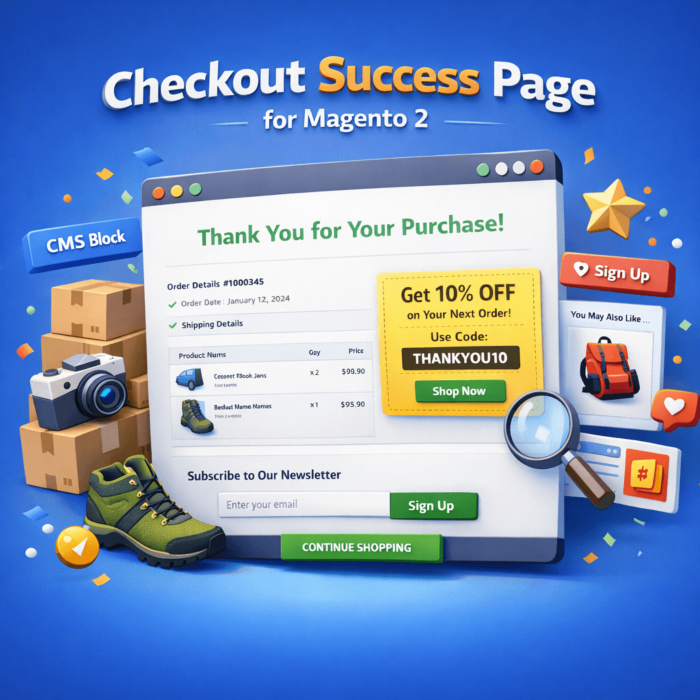
The default Thank You Page in Magento often ends the customer journey with a short message and an order number. This module turns the success page into a useful post‑purchase communication touchpoint, without heavy builders and without rebuilding the checkout.
What does the Kowal_CheckoutThankYouPage module do?
After an order is placed, it displays on the success page:
Standard Magento messages (order number + link to view the order if the customer has permissions) and information about the confirmation email.
Order details section (order date + standard Magento blocks with order information).
Order items view + totals — including taxes, and in Magento EE also gift card support (block added conditionally after configuration).
Additional container order.success.additional.info — other modules can inject their own content there.
Selected CMS block at the bottom of the success page (configured in the admin) — ideal for:
what to do next instructions
a repeat purchase CTA
a promotional banner
delivery/returns information
contact/FAQ links
Continue Shopping button.
Key advantages (directly reflected in the code)
Simple configuration: enable/disable + select one CMS block to display on the success page.
Works per store view (scope: default/website/store).
Efficient CMS rendering: the block content is processed by the standard CMS filter (directives, variables) and cached (24h by default) with a store‑scoped cache key.
No conflict with the larger module: if it detects an active Kowal_ThankYouPage (and enabled in configuration), then:
the option in the admin is frozen (disabled),
and the success page remains controlled by that larger module.
No tables or database changes: the installation is lightweight (layout + blocks + configuration).
ntegracja **Google Customer Reviews (Survey Opt-in)** na stronie podziękowania po zamówieniu (Success Page).
Nowy szablon: `view/frontend/templates/onepage/google_opinie.phtml` ładujący `platform.js` oraz renderujący `gapi.surveyoptin.render()`.
Nowy blok: `Kowal\CheckoutThankYouPage\Block\Onepage\Success\GoogleOpinie` generujący payload dla Google (merchant_id, order_id, email, delivery_country, estimated_delivery_date, products[].gtin).
Dodanie bloku do layoutu strony sukcesu (Success Page), z `cacheable="false"` (dane per zamówienie).
Konfiguracja
Rozbudowa `system.xml` o sekcję konfiguracji Google opinii:
W toursport.pl klienci po zakupie często szukali informacji “co dalej” — gdzie sprawdzić szczegóły zamówienia, jak wygląda wysyłka/realizacja, oraz jakie produkty dobrać jako akcesoria. Domyślna strona sukcesu Magento była zbyt uboga i nie dawała miejsca na czytelną instrukcję.
utrzymać pełne szczegóły zamówienia na stronie sukcesu (pozycje, kwoty, dane),
dodać na dole dedykowany blok CMS przygotowany dla toursport.pl.
W bloku CMS umieszczono m.in.:
krótką instrukcję “co dalej” (mail, czas realizacji, kontakt),
sekcję z linkami do pomocy (zwroty, reklamacje, regulamin),
banner zachęcający do kolejnych zakupów (np. akcesoria / dodatki),
komunikat sprzedażowy dopasowany do brandu.
Efekt
Klient od razu widzi nie tylko numer zamówienia, ale też komplet informacji i instrukcji.
Zespół sklepu może edytować treść bez udziału programisty — wystarczy podmiana bloku CMS.
Rozwiązanie jest lekkie i bezpieczne: nie ingeruje w proces zamówienia, tylko w widok sukcesu.
Pytania i odpowiedzi
Question
Co dokładnie mogę wyświetlić na stronie podziękowania?
Answer
Moduł pokazuje standardowe informacje o zamówieniu + pełny widok pozycji i podsumowanie, a dodatkowo pozwala wstawić dowolny blok CMS (baner, instrukcje, CTA, treści marketingowe).
Question
Czy mogę ustawić inną treść dla różnych sklepów / wersji językowych?
Answer
Tak. Ustawienia są dostępne w scope Website/Store View, więc możesz wskazać inny blok CMS dla każdej wersji sklepu.
Question
Czy da się szybko wyłączyć moduł i wrócić do standardowego widoku Magento?
Answer
Tak — w konfiguracji wystarczy wyłączyć “Custom Order Success Page”, a moduł pokaże domyślną stronę sukcesu Magento.
Question
Czy moduł jest bezpieczny dla wydajności?
Answer
Tak — treść bloku CMS jest cache’owana (domyślnie 86400s) i zależy od store view, więc nie obciąża niepotrzebnie strony.